Categories
Finance

Stock Market 101: How Filipinos Can Invest in Philippine Stock Market

Are you curious in exploring the potential of the Philippine stock market and harnessing its wealth-building opportunities? 

Investing in the stock market can be an effective way to grow your wealth and achieve financial goals. Whether you’re planning for retirement, saving for a major purchase, or seeking to build a diversified investment portfolio, the Philippine stock market offers a range of investment opportunities for individuals willing to take on calculated risks.

How to Invest in Philippine Stock Market

How to Get Started

1. Educate Yourself

Start by gaining a solid understanding of the stock market and its various components. Learn about different investment strategies, stock selection, risk management, and market trends. There are numerous online resources, books, and courses available to help you enhance your knowledge.

2. Set Your Investment Goals

Determine your financial goals and the timeframe in which you wish to achieve them. Are you looking for long-term wealth accumulation, retirement planning, or short-term gains? Clear goals will guide your investment decisions and help you stay focused.

3. Open a Trading Account

Choose a reputable stockbroker and open a trading account. Some popular stockbrokers in the Philippines include Philstock, COL Financial, BPI Trade, First Metro Securities, and BDO Securities. Each broker has its own account opening process, requirements, and fees, so be sure to research and compare before making a decision.

4. Fund Your Account

Once your trading account is set up, you need to deposit funds into it. Determine your investment budget and transfer the desired amount to your trading account. Most brokers offer multiple funding options, including bank transfers, online banking, or cash deposits.

Remember to conduct thorough research, seek professional advice if needed, and make informed investment decisions based on your financial goals and risk tolerance.

Categories
Finance

Top 5 Finance Apps in the Philippines

Managing your finances can feel overwhelming, but fortunately, there is a wide range of finance apps available to simplify the process.

In the Philippines, numerous finance apps have been developed to assist you in budgeting, saving, and investing your money effectively. In this article, we will highlight the top 5 finance apps in the Philippines that empower you to take charge of your financial journey and achieve your goals.

From tracking expenses and creating budgets to exploring investment opportunities and boosting your savings, these apps are designed to streamline money management. Regardless of your life stage or financial situation, these apps are invaluable tools for helping you reach your financial aspirations and secure a brighter future.

These apps combine professional features with a touch of fun and simplicity, making financial management engaging, accessible, and tailored to the unique lifestyle and preferences of millennials and Gen Z.

Top 5 Finance Apps in the Philippines

  1. Unionbank

The UnionBank app offers a smooth and convenient user experience. Customers can easily manage their finances while on the go thanks to this. Users may easily access different banking services and complete transactions with only a few clicks thanks to the apps user-friendly and straightforward navigation. Even better, you can open a bank account without ever leaving your home, use your phone to deposit checks, schedule bank visits, fund transfer and quickly and easily pay your credit card bills, utility bills, and other obligations.

Download the UnionBank app now and take charge of your finances with ease.

2. Gcash

This app has revolutionized the Philippines finance tech scene with the ease of creating an account, sending money, paying your bills, and even investing in the stock market. Surprisingly, it allows you to set reminders for due dates for bills and when to tap up your investment. With its simple yet powerful features, it simplifies the process of managing your finances, making it convenient and stress-free.

Try Gcash now.

3. Seabank

Do you want a convenient way to pay your Shopee budols and at the same time earn a high-interest rate?

This app is perfect for you! They are currently offering 5% p.a. credited daily with no maintaining balance. It’s easy to open an account with them and link it to your Shopee account.

Don’t miss out and earn 5% p.a. with Seabank.

4. Maya

Discover the power of the Maya app and say goodbye to the hassle of carrying cash and embrace seamless digital payments. In just a few taps on your phone, you can make secure transactions while enjoying exclusive deals and rewards. Whether you’re shopping online, paying bills, or buying from your favorite stores, PayMaya makes it easy and convenient. You can track your expenses, set budget limits, and gain better control over your finances.

Download the Maya app now and elevate your digital lifestyle!

5. Shopback

Did you know you can shop and earn at the same time?

Unlock a world of savings and cashback rewards with the Shopback app. Get discounts and exclusive offers from your favorite brands. Earn real cashback on your online purchases, and watch your earnings grow.

Discover a smarter way to shop and save with Shopback.

These apps could help managing your money easier and more efficiently than ever before. So, take the leap and try these finance apps today to start your journey toward financial success and a brighter future.

Categories
Finance Government

Simplify Your Life: How to Pay Your Pag-IBIG Home Loan with Gcash

Whether you’re a first-time homebuyer or a seasoned homeowner, managing your finances and payments can be overwhelming. That’s why Gcash has made it easier for you to pay your Pag-IBIG home loan. Gcash allows you to pay your loan anytime and anywhere. Plus, it’s a great way to save time and avoid the hassle of traditional payment methods. We’ll walk you through the process of paying your Pag-IBIG home loan using Gcash, step-by-step. Paying your Pag-IBIG home loan has never been easier with Gcash. Let’s dive in and get started!

How to Pay Pag-IBIG Home Loan in Gcash

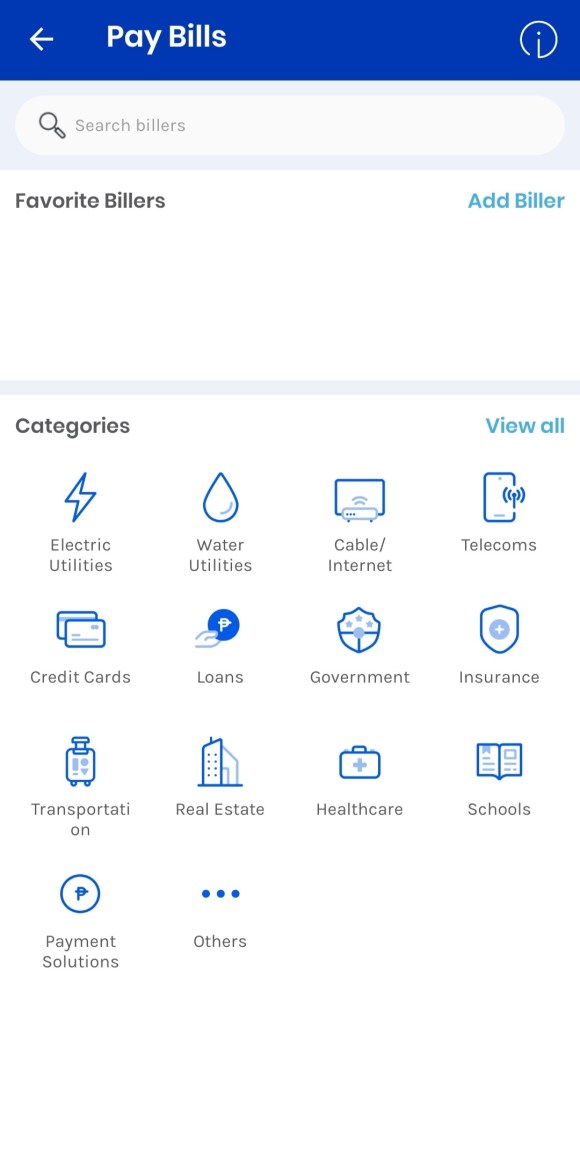
  1. Open the GCash app and choose Bills.
  1. Type Pag-IBIG.

3. Enter the desired amount, the housing loan option, the account number, the from and to dates, and email address.

4. Look over your payment.

5. Gcash will send you an email and text message to confirm a successful payment transaction.

Looking for more Pag-IBIG tips?

Check out our updated guides on lifeguide.ph to help you save time and manage your finances smarter. Stay tuned for more 2025 updates on contributions, loans, and benefits.

Categories
Finance Government

How to Pay Pag-IBIG MP2 Contribution in Gcash

As an adult, we know that investing in our future is crucial, but we also know the value of convenience and accessibility. Traditional over-the-counter payment methods can be time-consuming and confusing, leaving us feeling overwhelmed and unsure about our investments.

That’s why we’re excited to share with you this alternative way of paying your Pag-IBIG MP2 contributions.

By using Gcash, a mobile wallet that allows you to pay bills, transfer money, and even invest, you can now pay your MP2 contributions in just a few taps. We understand that the thought of managing your finances can be intimidating, but we aim to make the process engaging and easy to understand.

So if you’re an adult who wants to take control of your financial future, keep reading as we guide you through the step-by-step process of paying your MP2 contributions using Gcash. Get ready to learn, have fun, and secure your financial future without the hassle!

How to Pay Pag-IBIG MP2 Contribution in Gcash

  1. Go to GCash app and select Bills

2. Type Pag-IBIG and tap it.

3. Enter the amount, select MP2 Savings, account number, the period from and to, and email address.

4. Verify your payment.

5. You will receive a text and email confirmation from Gcash for successful payment transaction.

Looking for more Pag-IBIG tips?

Check out our updated guides on lifeguide.ph to help you save time and manage your finances smarter. Stay tuned for more 2025 updates on contributions, loans, and benefits.

Categories
Finance Government

How to Pay Pag-IBIG Contribution in Gcash

Updated: January 2026

How to Pay Pag-IBIG Contribution in GCash

You can now conveniently pay your contributions with just a few taps on your phone. This is a game-changer for everyone at any age you are and if prefer to do things digitally without leaving your house. We have different articles to guide you on how to pay your Pag-IBIG contributions in Gcash from contributions, house loans, and MP2 savings.

  1. Go to GCash app and choose Bills

2. Type Pag-IBIG and select it.

3. Enter the amount, select Members Contribution, account number, the period from and to, and email address.

4. Confirm your payment.

5. You will receive a text and email confirmation from Gcash for successful payment transaction.

Looking for more Pag-IBIG tips?


Check out our updated guides on lifeguide.ph to help you save time and manage your finances smarter. Stay tuned for more updates on contributions, loans, and benefits.